Thank you for playing the Fire Emblem Shadows game.
Here's what's new in Ver. 2.0.0.
New Feature: Support Effects
Unlock support conversations to change disciples' exclusive magic skills!
Unlock the newly added support conversation A+ and, with support effects, disciples can use their partner's exclusive magic skill.
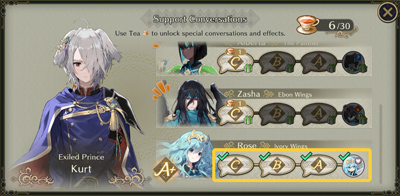
For more information on support conversations, see Watching Support Conversations!Example: Kurt
Unlock Rose's support conversation A+ to enable the changing of Kurt's exclusive magic skill to Rose's exclusive magic skill, Crossheal EX.
Tap on the exclusive magic skills icon on the Change Magic screen to see the skills that can be equipped!
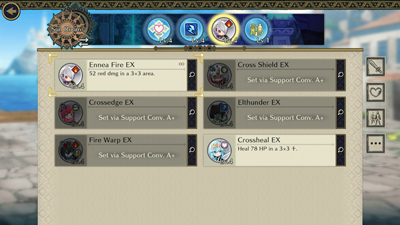
Unlock support conversation A+ for two or more disciples to allow them to exchange EX magic skills with their support partners.
However, it is not possible to equip the same support partner's exclusive magic skill for use in both the Sun and Moon rooms.
Try out various exclusive magic skill combinations!
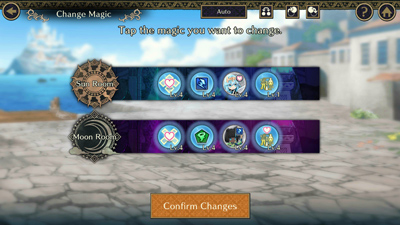
However, as with normal magic, you can equip the same exclusive magic skill for both light and shadow.
• The location of the exclusive magic skill cannot be changed.
• The exclusive magic skill level automatically adjusts to be the same or lower than the level of the equipping disciple. For example, if Kurt is level 5 and Rose is level 7, and Kurt equips Rose's exclusive magic skill, Crossheal EX, the skill will be at level 5 once equipped.
Additional Support Conversations
Unlock the following support conversations from 09/24/2026 (Thu) 11:00 p.m. (PT).
Dietrich × Skoll
Black Knight × Ike
Improved Featured Soul Visibility
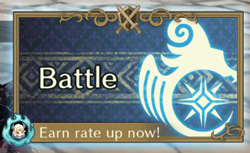
Icons of currently featured disciple Souls now appear at the bottom left corner of the home screen's Battle button.
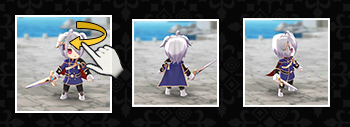
3D Models of Disciples Now Rotate
In the following situations, you can now rotate the 3D models of disciples by swiping from left to right.
• The disciple in the center of the Stats screen when selecting between the Stats, Weapons, and Outfits menus.
• The disciple to the left of the Change Weapon button.
• The disciple to the left of the Change Outfit button.
After Clearing Book 1, Choose the Next Book
Now when you collect all the story rewards in Book 1, you can choose the next Book you wish to tackle.
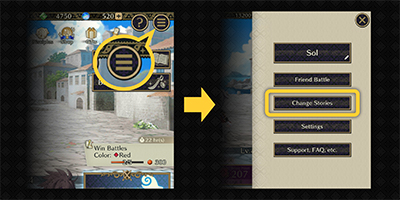
To change stories, tap the top right menu button in the home screen and choose Change Stories.
Furthermore, you can choose different stories for light and shadow.
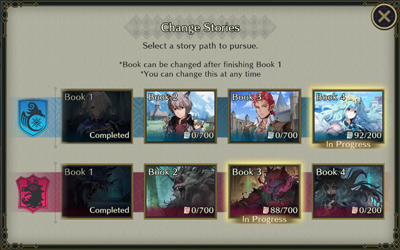
After you change Books, story rewards from battle will progress for the chosen Book, unlocking more stories and rewards.
You can change stories at any time.
Home Screen Now Reflects Book 4 Content
For Ver. 2.0.0 and above, the home screen features a calming coastal background, reflecting Book 4's content.
Main Image Changed
The image shown when the app launches has also been changed to reflect the content of Book 4.
Beginner Support Pack Available Again
The Beginner Support Pack is available again from 09/24/2026 (Thu) 11:00 p.m. (PT).
Furthermore, players who have previously reached the purchase limit of the Beginner Support Pack before 09/24/2026 (Thu) 10:59 p.m. (PT) can purchase the pack again.
• The sale period runs until 09/24/2027 (Fri) 10:59 p.m. (PT).
• The content of the Beginner's Support Pack remains the same.
New Map Added
A new labyrinth map, Grotto, has been added.
The Sun Room and Moon Room maps will be randomly selected for each battle, with the labyrinth changing weekly.
Please check the weekly "This week's treasure and labyrinth maps!" article for map details.
Other Minor Changes and Bug Fixes
• Improved how story scenes are displayed.
• Improved resolution of disciple Profile screen and disciple unlock images.
• Some improvements have been made to graphics and sound.
• Several issues were fixed to improve the gameplay experience.
Season Pass Update
A new Season Pass, Fair Shadow, will begin from 09/24/2026 (Thu) 11:00 p.m. (PT).
This Season Pass will allow you to unlock a new disciple, Dietrich: Fair Shadow.
That's all for our update announcement.
Thank you for playing the Fire Emblem Shadows game.
• The version can be checked at the upper right of the title screen.
• If you have trouble updating the application, please check for updates at your device's store.
• Please be aware that if you have not linked to your Nintendo Account, you will not be able to retrieve your play data after uninstalling the app.